
About the Test Cases Library
The Test Cases library is the central repository for all your test cases in Quash. Every test case your team creates — whether generated by Megumi in Test Studio, or written manually — lives here and can be reused across any number of suites. To access Test Cases: Click the Test Cases icon in the left navigation panel.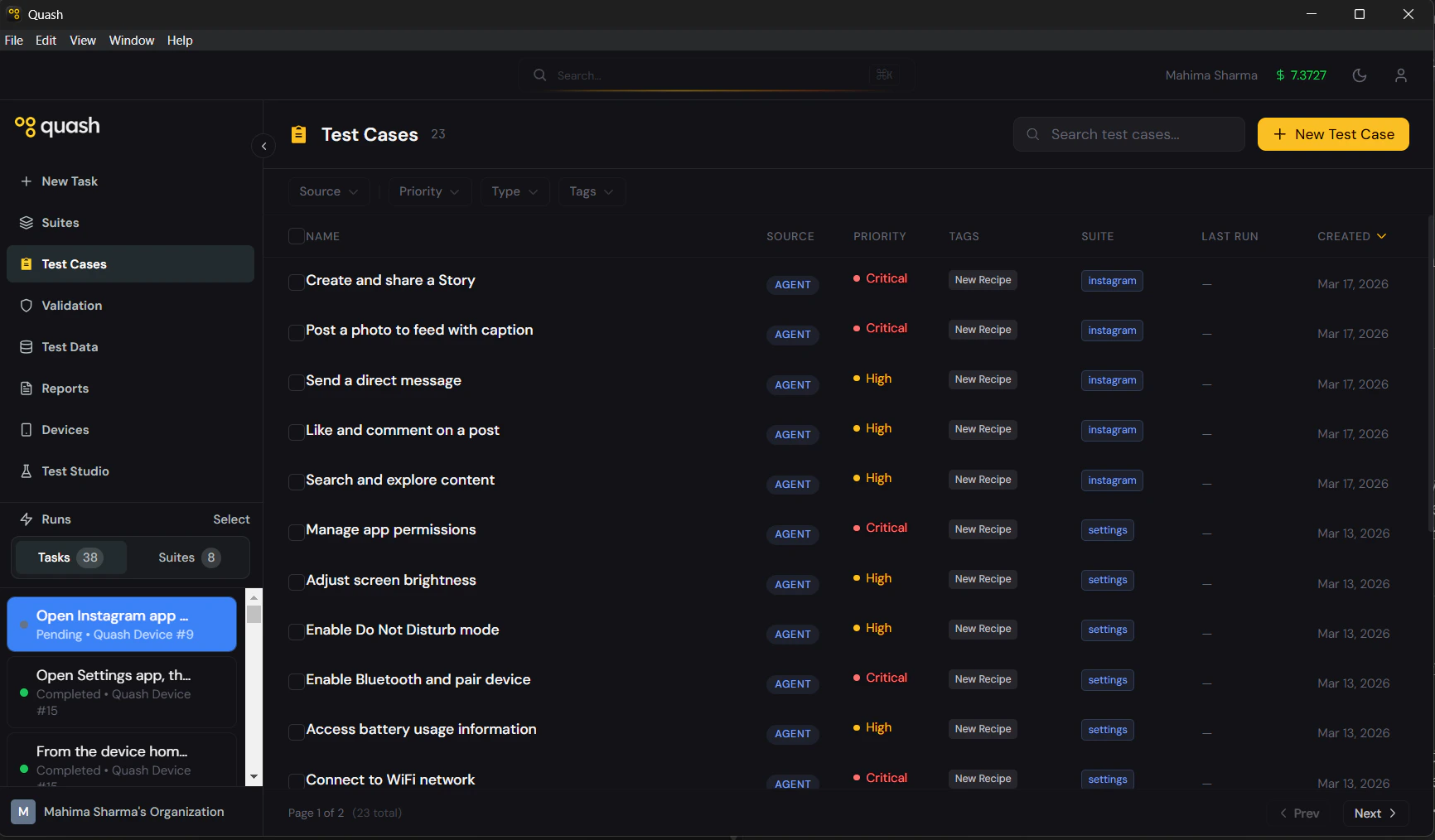
The library list
The library shows every test case in your workspace as a table. Each row displays:Filtering and searching
The filter bar at the top of the list lets you narrow down by source, priority, or type.- Agent / Manual tabs — filter by how the test case was created
- Priority dropdown — filter to Critical, High, Medium, or Low
- Type dropdown — filter to Functional, Smoke, Regression, E2E, or Custom
What you can do from the library
- Open any test case to view or edit its details
- Create a new test case manually with + New Test Case
- Select multiple test cases to add them to a suite or delete them in bulk
- Filter by source, priority, or type to find what you need quickly
How test cases fit into your workflow
Test cases are the building blocks that suites are made of. The typical flow is:- Create test cases — in Test Studio by prompting Megumi, or manually
- Add them to suites — group related cases for a feature, flow, or release cycle
- Run the suite — Mahoraga executes each case and reports results