Documentation Index

Fetch the complete documentation index at: https://quashbugs.com/docs/llms.txt

Use this file to discover all available pages before exploring further.

Integrations

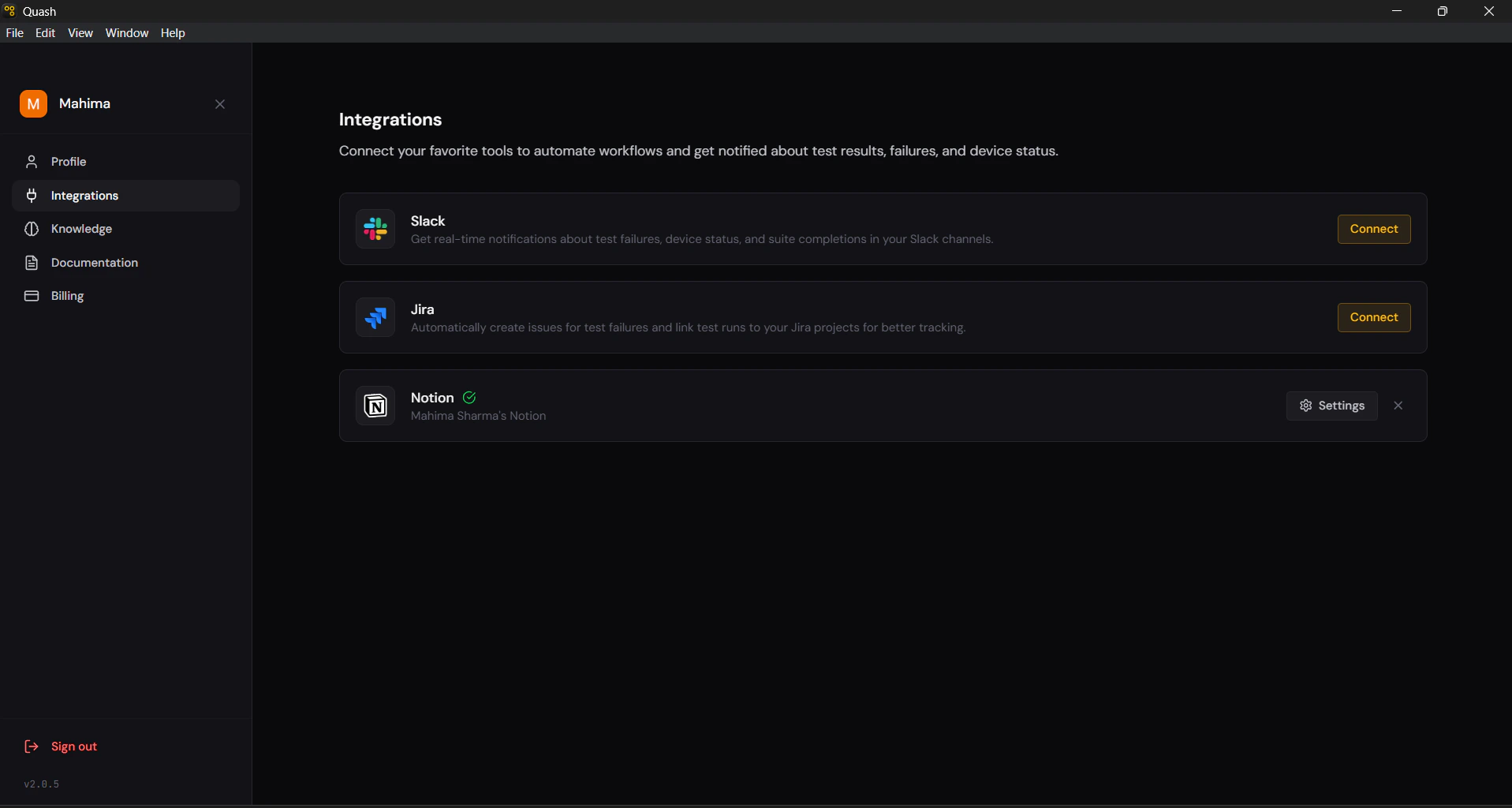
Integrations connect Quash to the tools your team already works in. Once set up, Quash can notify your Slack channels when tests fail, automatically create Jira issues from failures, sync with Notion, and read your Figma designs directly during test generation. To access Integrations: Click the profile icon in the top right → select Integrations from the left panel.

Available integrations

![](/images/image (24).png)
IntegrationWhat it does
SlackReal-time notifications about test failures, suite completions, and device status in your Slack channels
JiraAutomatically create issues for test failures and attach Jira tickets as context in Test Studio recipes
NotionConnect your Notion workspace for documentation and reporting workflows

How connecting works

Each integration on the Integrations page has a Connect button. Clicking it starts the connection flow for that tool — usually an OAuth redirect or a URL-based setup. Once connected, the button changes to Settings, and a green checkmark appears next to the integration name along with the connected account. To disconnect any integration, click Settings and then the button.