
How to insert a slug
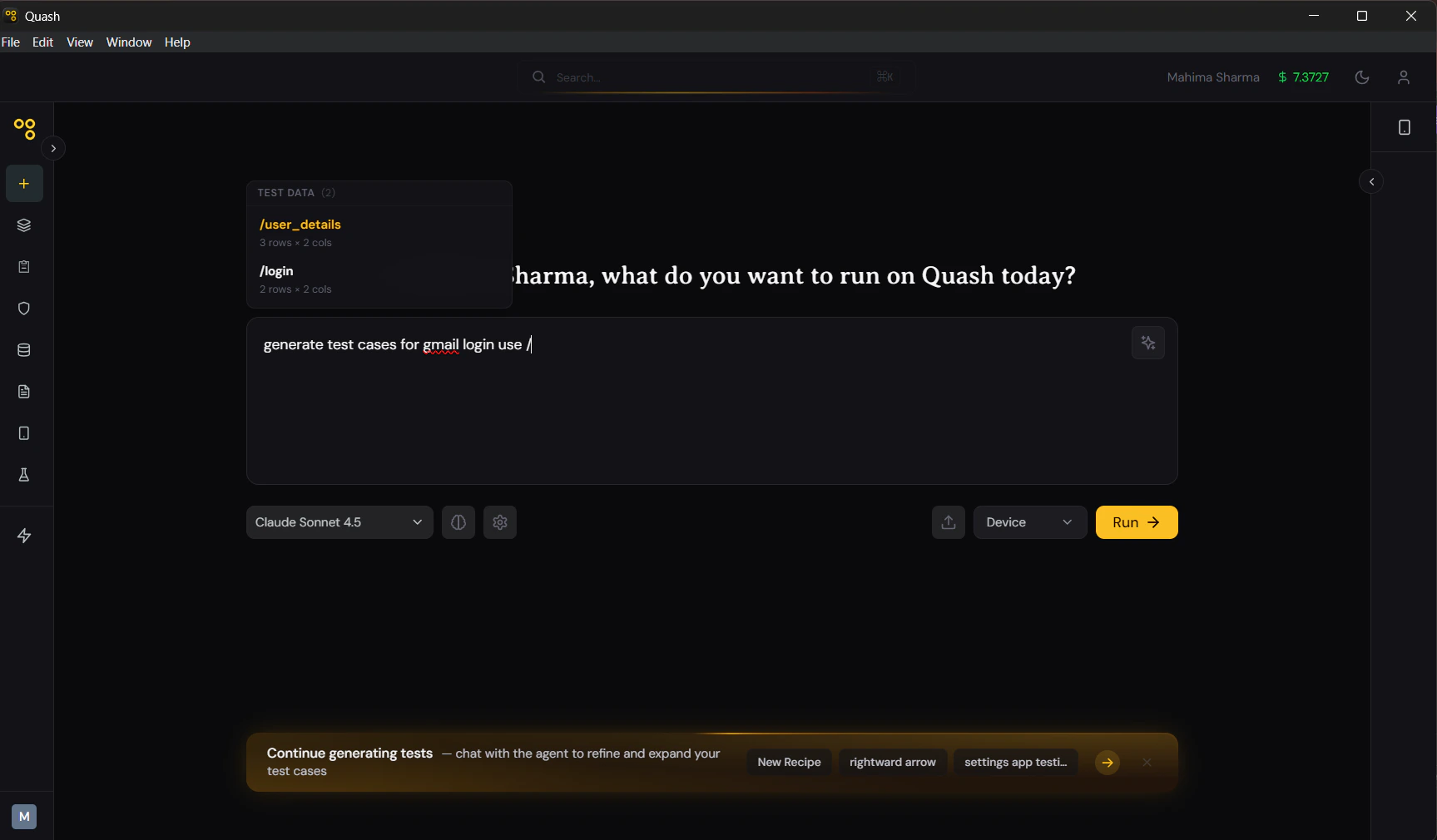
Type/ in any task prompt or recipe prompt input. A dropdown appears listing all available datasets with their slugs and dimensions — e.g., /login-credentials (3×4). Select the one you want. The slug is inserted at the cursor position.
You can also type the slug directly if you know it — /login-credentials — without using the dropdown.
What happens when a task runs with a slug
When Mahoraga encounters a/slug reference in a task prompt, it fetches the dataset and reads each row in sequence. The task runs once per row — a complete, independent execution for each set of inputs.
Example dataset — /login-credentials:
Task prompt:
- Run 1 — logs in as valid@example.com / Correct123!, verifies home dashboard loads
- Run 2 — attempts login with wrong password, verifies error message appears
- Run 3 — attempts login with locked account, verifies locked account message
Placing the slug in your prompt
Where you place the slug in your prompt determines the context Mahoraga uses it in. Place it where the data is needed — not at the end as an afterthought. Good placement:Using multiple datasets in one prompt
You can reference more than one dataset in a single task prompt by including multiple slugs. Quash handles them as a cross-product — every combination of rows from each dataset. Use this sparingly. Two datasets with 5 rows each produce 25 runs. Three datasets with 5 rows each produce 125 runs. For most scenarios, one dataset per task is cleaner.Referencing dataset columns explicitly
When your prompt needs to refer to a specific column value, you can name the column directly. Recipe understands column names and maps them to the right values.search_term and expected_category are column names in the /search-queries dataset. Mahoraga reads the column names and uses the correct value from each row.
Slugs in Test Studio recipes
Slugs work the same way in Test Studio recipes. Type/ in the recipe prompt area — the same dropdown appears. Recipe uses the dataset as context when generating test cases, and Mahoraga uses it during execution.
Using a dataset in a recipe is particularly powerful for data-driven test generation — Recipe can see the full table and generate test cases that cover the different scenarios implied by each row type (valid inputs, invalid inputs, edge cases) rather than treating all inputs as equivalent.