Best Continuous Testing Tools in 2026: 17 Options Compared

A test can pass on your laptop and still fail to protect a release when it never runs on the pull request, in the right browser, or on the device your customers use. Continuous testing connects a change to automated checks, an execution environment, and a release decision.The best continuous testing tools depend on the layer you need. Playwright, Selenium, Cypress, and Appium are test frameworks. Jenkins, GitHub Actions, GitLab CI, and CircleCI orchestrate work in CI/CD. Sauce Labs, BrowserStack, and TestMu AI provide managed browsers and devices. The comparison below covers 17 options so you can choose a stack instead of expecting one product to do every job.
For a framework-level view, broader comparison of test automation frameworks helps separate runner choices from orchestration and managed-device coverage.
What is continuous testing?
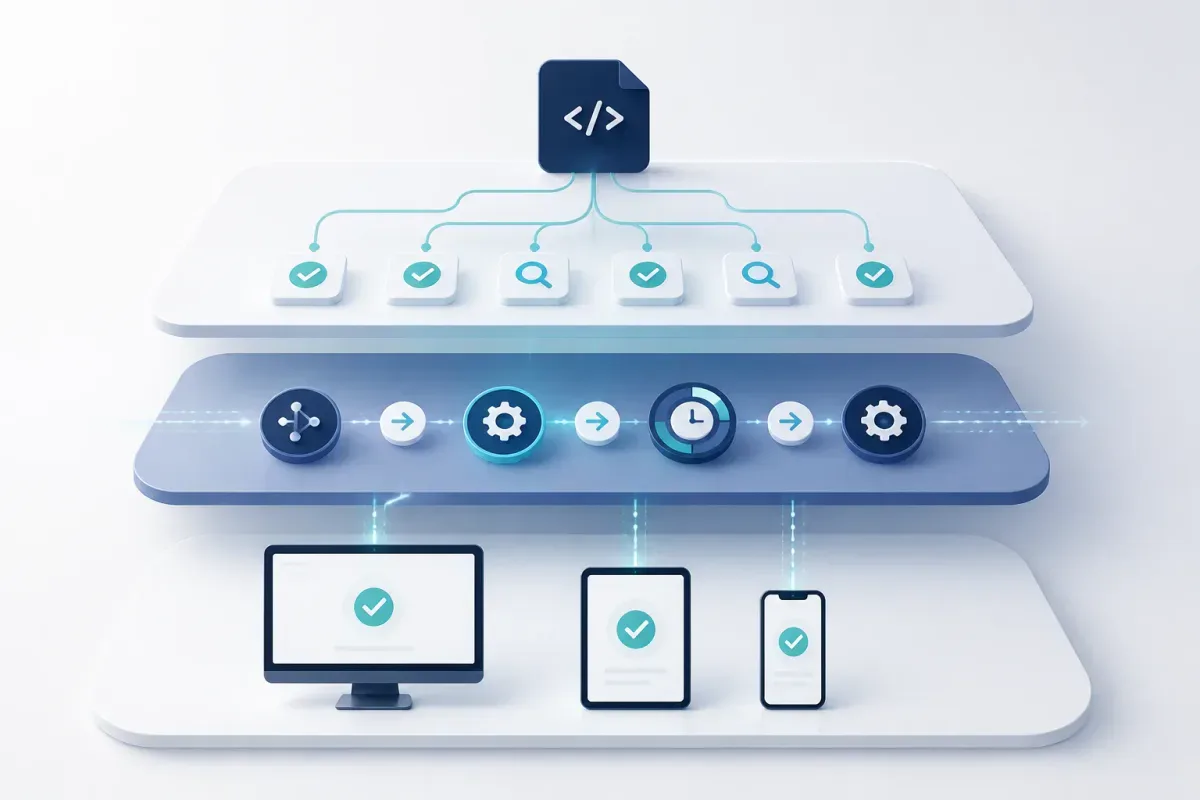
Continuous testing means running automated checks throughout your CI/CD pipeline so you receive quality feedback soon after a change. Bitrise’s continuous testing guide describes testing as part of delivery rather than a phase saved for the end.Test automation is the ability to execute a test without manual steps. Continuous testing is the operating model that connects tests to commits, pull requests, builds, deployments, and release gates. This guide to DevOps testing provides useful context for fitting those checks into delivery.A complete stack generally has three layers:
Test authoring and execution:
Selenium, Playwright, Cypress, and Appium define and run tests.
Pipeline orchestration:
Jenkins, GitHub Actions, GitLab CI, and CircleCI decide when tests run and return their status.
Managed environments:
Sauce Labs, BrowserStack, and TestMu AI provide browsers, simulators, emulators, or real devices.
Commercial platforms can combine layers, reducing integration work but sometimes making your tests and execution model harder to move.

Get the Mobile Testing Playbook Used by 800+ QA Teams
Discover 50+ battle-tested strategies to catch critical bugs before production and ship 5-star apps faster.
Continuous testing tools at a glance
This is not a universal ranking. “Best” needs a stated use case, so the table identifies the scenario each option suits. Published entry prices are vendor-listed starting points, not your predicted total cost. Open-source software is free to license; infrastructure and engineering time are not.
Tool | Primary layer | Best for | Published entry point | Authoring model |
Selenium | Framework | Multi-language web automation | Free | Java, Python, C#, Ruby, JavaScript, Kotlin |
Playwright | Framework | Modern cross-browser web apps | Free | TypeScript/JavaScript, Python, .NET, Java |
Cypress | Framework + cloud | JavaScript front-end teams | Free runner; Cloud Team $67/month annual | JavaScript/TypeScript |
Appium | Framework | Native and hybrid mobile apps | Free | WebDriver-client languages |
Katalon Studio | Platform | Mixed-skill web, mobile, API, and desktop QA | $84/seat/month annual for first three Enterprise seats | Codeless and Groovy/Java |
Functionize | AI platform | Codeless web automation | Pro $18/month annual | Natural-language authoring |
ACCELQ | AI platform | Business-process automation | Free for individuals; paid plans quoted | Codeless |
Tricentis Tosca | Enterprise suite | Complex packaged applications | Not publicly listed | Model-based |
Parasoft | Enterprise suite | Regulated software engineering | Not publicly listed | Product-specific tooling |
Sauce Labs | Cloud execution | Managed browser and mobile execution | Live Testing $39/month annual | Framework-dependent |
BrowserStack | Cloud execution | Broad real-device and browser coverage | Live $12.50/month annual | Framework-dependent |
TestMu AI | Cloud + AI | Device execution with AI-assisted authoring | KaneAI Starter $17/month annual | KaneAI or external framework |
Jenkins | Orchestration | Self-hosted, extensible pipelines | Free | Framework-dependent |
GitHub Actions | Orchestration | GitHub repositories | Free tier; usage beyond included minutes | Framework-dependent |
GitLab CI | Orchestration | GitLab-based DevOps | Free tier; Premium $29/user/month annual | Framework-dependent |
CircleCI | Orchestration | Flexible cloud compute and parallelism | Free; Performance from $15/month | Framework-dependent |
QA Wolf | Platform + service | Managed or usage-based end-to-end testing | 1¢/AI credit + 15¢/runner minute | Platform or managed service |
Price the exact product combination you need. A vendor’s cheapest live-testing plan may not include automated mobile execution, while a CI provider’s included minutes may not match your runner operating system or size.
Open-source test frameworks
Selenium: best for multi-language web automation
Selenium is an open-source browser-automation project. WebDriver drives browsers programmatically, Grid distributes tests across machines, and Selenium IDE supports record-and-playback work.Choose Selenium when you need broad language support, have an established Selenium suite, or want flexibility in execution infrastructure. Its ecosystem makes it practical to connect to almost any CI service or cloud device provider.Pricing: Free and open source.Where it falls short: Selenium is not a full continuous-testing platform. It supplies no CI runner, hosted device lab, or native mobile driver. You assemble those components, often with Appium for mobile and a cloud provider for broader coverage. It fits you best when you have automation engineering capacity to own that work.
For teams building around Grid, running Selenium tests in parallel helps connect its distributed execution model to practical suite design and infrastructure choices.
Playwright: best for modern cross-browser web applications
Playwright is Microsoft’s web-testing framework for Chromium, Firefox, and WebKit. The project repository identifies it as Apache 2.0 licensed.Playwright suits you when you build modern web applications and want a CLI-native framework supporting TypeScript/JavaScript, Python, .NET, and Java. Auto-waiting, isolated browser contexts, web-first assertions, parallel execution, and sharding make it a strong candidate for pull-request checks.Pricing: Free and open source under the Apache 2.0 license.Where it falls short: Playwright can emulate mobile browser conditions, but it is not a native iOS or Android automation driver. It also does not include a real-device fleet or hosted CI. Pair it with Appium for native apps and a device cloud where physical hardware matters.
Cypress: best for JavaScript front-end teams
Cypress combines an open-source JavaScript test runner with the paid Cypress Cloud service. Cypress Cloud adds hosted run data and commercial workflow features.Cypress fits you when your application and test team already center on JavaScript or TypeScript and quick front-end debugging matters more than language flexibility. The runner works from the command line in CI; the Cloud tier is relevant when you need its hosted capabilities.Pricing: The runner is free. Cypress Cloud pricing lists its Team plan at $67 per month when billed annually, or $799 per year, for 50 users and 120,000 test results per year. Business and Enterprise pricing are custom.Where it falls short: Cypress is web-focused and JavaScript/TypeScript-only. It is not a native mobile framework, so it is not the primary choice for iOS or Android automation.
Appium: best for cross-platform native mobile automation
Appium is an open-source framework using the WebDriver protocol to automate iOS, Android, and Windows applications. It supports native, hybrid, and mobile web applications.Choose Appium when you need a common automation approach across iOS and Android and can support the operational work around drivers, signing, devices, and platform-specific setup. It can run in any CI system, but that system must supply emulators, simulators, devices, or a cloud device lab.Pricing: Free and open source.Where it falls short: Appium has no device lab, codeless authoring, or CI service. Its flexibility comes with setup and driver-management work. Pair your UI suite with an appropriate integration testing strategy rather than expecting end-to-end tests to cover every service interaction.
Commercial automation platforms
Katalon Studio: best for mixed-skill QA teams
Katalon combines web, mobile, API, and desktop testing with codeless record-and-playback and Groovy/Java scripting. Its published packages include reporting, test-case management, and CI/CD-oriented capabilities.Katalon is best for you when QA engineers and less-technical testers must contribute to the same automation program. You gain a broader product surface than a web-only framework, which can reduce how many systems you coordinate.Pricing: Katalon pricing lists Studio Enterprise at $180 per seat per month month-to-month, or $84 per seat per month annually for the first three seats. From the fourth annual seat, the listed price is $150 per seat per month. True Platform and True Automation use separate plans.Where it falls short: The IDE-centered workflow is heavier than a CLI-first framework, and seat pricing can grow as more people need access. Compare annual seat cost with the implementation and maintenance work the wider platform removes.
Functionize: best for codeless, AI-assisted authoring
Functionize describes its cloud platform as natural-language test authoring with self-healing tests and autonomous testing agents. These are vendor-described capabilities, not independently benchmarked reliability results, so validate them against your own application.Functionize can fit you when scripted authoring is a bottleneck and web-oriented automation is your main need. The key buying question is whether credits and parallel runs cover your representative CI workload.Pricing: Functionize pricing lists Free with 200 credits and five parallel runs; Pro at $20 per month month-to-month or $18 per month annually with 400 credits and five parallel runs; and Max at $100 month-to-month or $90 annually with 2,000 credits and 10 parallel runs. Enterprise pricing is custom.Where it falls short: Natural-language suites can be less portable than code-based tests, and cloud delivery may not fit every security boundary. Self-healing may reduce maintenance work, but you still need to review whether a changed test represents intended product behavior.
ACCELQ: best for business-process-level codeless automation
ACCELQ presents a codeless, AI-driven platform for web, mobile, API, and desktop testing, with business-process-level design rather than conventional scripting.Choose ACCELQ when business analysts or manual QA contributors need to participate directly in automation and your workflows map well to end-to-end business processes.Pricing: ACCELQ pricing offers a free individual tier. It does not publish paid team and enterprise prices, so you need a quote for a like-for-like comparison.Where it falls short: Codeless authoring can constrain unusual or highly technical workflows. Treat its AI functions as vendor capabilities to trial, not a common measure of reliability.
Enterprise continuous-testing suites
Tricentis Tosca: best for complex packaged applications
Tricentis Tosca is commonly evaluated for model-based, no-script enterprise automation across complex application landscapes. Detailed product claims and integration lists are not verified here because its primary vendor pages were unavailable in the supplied evidence.Tosca belongs on your shortlist when you run large, integrated packaged systems and need to investigate governance, traceability, and enterprise implementation support. It is unlikely to be a proportionate first choice for a small web product that can meet its needs with Playwright or Cypress.Pricing: No verified public price is available in the supplied evidence. Ask sales for licensing, implementation, concurrency, environment, and support costs in writing.Where it falls short: The implementation and training commitment can be enterprise-scale. Require a demonstration using your applications and release workflow before you make a decision.
Parasoft: best for regulated software engineering
Parasoft’s solutions page describes a product family spanning static analysis, unit testing, API and UI testing, virtual assets, test data, and Selenium-focused tooling. It lists standards and compliance areas including AUTOSAR C++14, CERT, CWE, DO-178C, IEC 62304, ISO 21434, ISO 26262, MISRA, and OWASP.Parasoft is best for you when traceability, coding-standard enforcement, and compliance evidence are core requirements. It is a different purchase from a lightweight browser-automation framework.Pricing: Parasoft pricing is a request-pricing route, not a public rate card.Where it falls short: Its compliance depth can be unnecessary overhead for a consumer web or mobile product without those obligations. Assess whether your compliance boundary requires this class of platform.
Cloud execution platforms and device labs
Sauce Labs: best for managed cross-browser and mobile execution
Sauce Labs provides cloud execution for desktop browsers, mobile devices, emulators, and simulators. It offers manual Live Testing and automated virtual-cloud and real-device-cloud products.Use Sauce Labs when your constraint is browser and device infrastructure, not authoring tests. You still write tests in a framework such as Selenium, Playwright, or Appium and connect the service to CI.Pricing: Sauce Labs pricing lists Live Testing at $39 per month when billed annually for one parallel test. Virtual Cloud is listed at $149 per month annually and Real Device Cloud at $199 per month annually, each at one parallel test; Enterprise pricing is custom.Where it falls short: It is an execution layer, not a test framework. Price it at the concurrency and real-device coverage you need. For an adjacent platform comparison, see these Sauce Labs alternatives.
BrowserStack: best for broad real-device and browser coverage
BrowserStack provides managed browser and real-device infrastructure for manual and automated testing, including App Automate for native mobile applications.BrowserStack is best for you when the main problem is broad device and browser access without operating a lab. It sits beneath Selenium, Playwright, Appium, and other frameworks rather than replacing them.Pricing: BrowserStack pricing lists Live Testing Freelancer at $12.50 per month annually. Automate Desktop starts at $59 per month annually for one parallel test; Desktop & Mobile Automate starts at $175 per month and App Automate at $199 per month, with additional tiers and enterprise options.Where it falls short: Its product lines are separate, so the least expensive plan may not cover the execution type you require. Costs rise with parallelism and coverage.
TestMu AI: best for integrated device execution and AI-assisted authoring
TestMu AI, formerly LambdaTest, combines browser and real-device execution with KaneAI, its AI-assisted test-generation product. You may encounter the former brand in older documentation and integrations.Choose TestMu AI when you want managed execution and AI-assisted authoring under one vendor relationship. It is less natural if you want a narrowly scoped open-source framework with independently selected supporting services.Pricing: TestMu AI pricing lists KaneAI Starter at $17 per month annually, or $19 month-to-month, with 2,000 credits. Pro is $89 per month annually and Max is $179 per month annually. Real Device Plus Live starts at $39 per month annually; Enterprise pricing is custom.Where it falls short: Pricing spans product lines, so model both authoring and device execution. AI generation and failure-analysis claims are vendor descriptions, not an independent quality benchmark.
CI/CD infrastructure for testing
Jenkins: best for self-hosted, extensible pipelines
Jenkins is an open-source automation server for self-managed CI/CD. Its official plugin index lists more than 2,000 community-contributed plugins.Jenkins is best for you when you need infrastructure control and have the DevOps capacity to maintain it. It can trigger nearly any test framework through plugins, scripts, and APIs.Pricing: Free and open source; you pay for infrastructure and maintenance.Where it falls short: Jenkins is orchestration, not test authoring or device execution. Plugin selection, upgrades, and operational ownership can become substantial work.
GitHub Actions: best for GitHub-native teams
GitHub Actions provides workflow-based automation on GitHub-hosted or self-hosted runners. Its pull-request and repository integration make it a direct CI layer for repositories hosted on GitHub.Pricing: GitHub’s Actions billing documentation lists 2,000 minutes per month for private repositories on Free, 3,000 on Team, and 50,000 on Enterprise. Beyond included minutes, baseline two-core x64 rates are $0.006 per minute for Linux, $0.010 for Windows, and $0.062 for macOS; larger runners cost more.Where it falls short: GitHub Actions ties your workflow to GitHub, and spending grows with long or highly parallel suites. It runs tests but does not supply the framework or a physical-device fleet. This overview of CI/CD tools for DevOps offers related selection context.
GitLab CI: best for integrated GitLab DevOps
GitLab CI uses .gitlab-ci.yml to define pipelines inside GitLab’s source-control, merge-request, registry, and environment platform.Pricing: GitLab pricing lists the SaaS Free tier with 400 compute minutes per month. Premium is $29 per user per month when billed annually and lists 10,000 compute minutes per month; Ultimate is custom-priced and lists 50,000 compute minutes per month.Where it falls short: GitLab CI is pipeline infrastructure, not a test framework. It makes most sense when your source-control and delivery workflow already live in GitLab.
CircleCI: best for flexible compute and parallelism
CircleCI is a cloud CI/CD service with Docker, Linux, Windows, macOS, Arm, and GPU resource classes. It connects with GitHub, GitLab, and Bitbucket.Pricing: CircleCI pricing lists a Free plan with up to 6,000 build minutes on the small Docker resource class, up to five active users, and 30x concurrency. Performance starts at $15 per month with 30,000 credits. The listed conversion example is approximately 3,000 Linux Medium build minutes at 10 credits per minute.Where it falls short: Credits make direct comparisons difficult because consumption varies by resource class and add-ons. CircleCI supplies orchestration, not test authoring or device infrastructure.
Hybrid and managed testing
QA Wolf: best when you want testing ownership outside your team
QA Wolf offers a platform tier and a Coverage as a Service tier. The managed option has QA Wolf engineers write, run, and maintain tests; its site says it uses Playwright for web and Appium for mobile.QA Wolf is best for you when the limiting factor is not another framework but the people required to establish and maintain end-to-end coverage. Its platform tier is an alternative if you prefer usage-based billing without per-seat licensing.Pricing: QA Wolf pricing lists 1¢ per AI credit and 15¢ per runner minute for its platform, with no per-seat fees. Coverage as a Service is custom-priced based on tests under management.Where it falls short: A managed service changes your ownership model and may not fit strict third-party access or on-premise requirements. Ask who owns the test code, how changes are reviewed, and what happens if you leave.
How mobile QA fits into continuous testing
A pipeline can trigger mobile tests without solving mobile QA. You still need coverage for device fragmentation, lifecycle state, permissions, network transitions, native UI behavior, and fast bug reproduction.For native iOS and Android automation, Appium plus a real-device cloud is a common technical foundation. Choose BrowserStack, Sauce Labs, TestMu AI, or self-managed hardware based on the devices, operating systems, and concurrency your releases require. This guide to mobile testing tools can help you map the categories around that execution layer.Quash is an adjacent mobile QA and testing devtool, not a replacement for Jenkins, Playwright, Appium, or a device cloud. Evaluate it within your mobile QA workflow alongside your framework, runner, and execution environment. No relevant Quash telemetry, recurring bug-pattern dataset, customer quotation, or completed experiment is available for a comparative performance claim in this guide.
What AI-native testing means
“AI-native” is a product label, not one measurable capability. Establish which functions a vendor actually provides:
Test generation
creates tests from natural-language descriptions or observed behavior.
Self-healing locators
attempt to update selectors after interface changes.
Failure analysis
groups failures, identifies likely causes, or separates flaky results from probable defects.
Test selection
uses change information to choose tests for a commit.
Martin Fowler’s explanation of test impact analysis
provides context for this distinct category.
Functionize, TestMu AI, and QA Wolf describe AI-assisted generation. Katalon, Functionize, ACCELQ, and TestMu AI describe self-healing. These are vendor-described functions, not a shared performance standard.No independent benchmark in the supplied evidence compares the accuracy of vendors’ self-healing, generated tests, or root-cause classification. During a trial, seed representative UI changes, inspect false positives and false negatives, and measure the review work your team still performs.
How to choose a continuous testing tool
Use your delivery constraints to narrow the list before comparing features.
Start with the system under test.
For a modern web app, trial Playwright, Cypress, or Selenium. For native and hybrid mobile apps, include Appium and a device cloud. For regulated or packaged software, investigate Parasoft and Tosca.
Choose an authoring model.
Code-based frameworks offer portability and version control. Codeless and natural-language platforms can widen participation, but can limit direct control and make migration harder.
Choose an execution environment.
If you can operate browsers and devices, an open-source framework plus CI may be enough. If you need real-device coverage, price cloud platforms at the concurrency you require.
Match CI to the repository.
GitHub Actions naturally fits GitHub; GitLab CI fits GitLab; CircleCI is a separate hosted service; Jenkins trades operational work for self-hosted control.
Model full cost.
Include seats, runner minutes, credits, parallel tests, device access, infrastructure, implementation, and maintenance. A free license is not a free program when you build each missing layer.
Set a compliance boundary.
Traceability, coding-standard enforcement, and safety evidence can justify an enterprise suite even where a web framework executes quickly.
Run a representative trial.
Use production-like tests, target devices and browsers, and the CI events that gate real releases. Measure completion time, reruns, review effort, and cost at required concurrency.
What the market does not publish
Public comparisons are better at listing features and entry prices than measuring production outcomes. No independently verified adoption breakdown in the supplied evidence shows which continuous-testing tools organisations use in production pipelines, at what scale, or with what failure rates.The same gap applies to maintenance and AI claims. Vendors describe self-healing, generation, and failure analysis, but public evidence does not provide a common independent benchmark for accuracy. Do not turn a vendor feature list into an objective ranking.Your most useful evidence is a controlled evaluation with your own applications, repositories, target devices, and release gates. It shows whether a tool detects the failures you care about, how much maintenance it requires, and what execution costs in your environment.
Conclusion
The best continuous testing tools solve the constraint in your delivery path. Choose a framework for how you test, a CI layer for when tests run, and an execution environment for where they run. Then validate the complete path—from code change to actionable result—against your releases before committing to an enterprise suite, all-in-one platform, or managed service.
Continue reading
More articles from the Quash editorial desk.